
A pixel mega tree is the centrepiece of many Christmas light shows. Here is what you need, how it goes together, and how to set it up in xLights.
What is a pixel mega tree?
A pixel mega tree is a tall cone of lights. Strings of pixels run from a ring at the top of a pole down to the ground, spread out in a circle. When you run a sequence in xLights, the whole tree becomes one big screen. It can spin, swirl, show stripes, run text, and dance to music.
What you need
- A pole: a strong, straight pole for the centre, set firmly in the ground or in a base.
- A mega tree topper: the ring at the top of the pole that holds every pixel string in place.
- Pixel strips: long strips with 12 mm holes up the centre, 25 mm apart. They come in different lengths, and they hang from the topper down to the ground.
- Pixel strings: 12 mm pixels that push into the holes in the strips.
- Ground stakes or a base ring: these hold the bottom of each string, so the tree keeps its cone shape.
- A star (optional): a pixel star on top finishes the tree.
- A pixel controller and power supply: these run the pixels from your xLights show.
- Guy wires: these keep the pole steady in the wind.
How it goes together
- Fit the topper to the top of the pole. Our steel toppers have a 38 mm centre hole, and we can cut other sizes if you ask.
- Hang the pixel strips from the topper. Each strip hangs from one of the topper holes with a J bolt.
- Fill each strip with pixels (see “Filling a pixel strip” below).
- Stand the pole up and tie it off with guy wires. The toppers have holes for guide wires.
- Spread the strips out in a circle and peg the bottom of each one to a ground stake, so the tree makes a cone.
- Add the star on top, if you are using one.
- Connect the pixel strings to your controller and power supply, then set the tree up in xLights.
Filling a pixel strip
This is how one 100 node string goes up and back down the same strip, so it starts and finishes at the bottom:
- Start at the bottom of the strip.
- On the way up, push a pixel into every 2nd hole, and skip the holes in between.
- When you reach the top, turn around.
- On the way back down, fill the holes you missed.
With holes 25 mm apart, a 100 node string fills about 2.5 m of strip (100 holes × 25 mm). This is why you tick Alternate Nodes in xLights: it tells xLights the pixels are in this up-and-back order.
How many strings and nodes?
How many strings you use is up to you. Most people start with 100 node strings: each string runs 50 nodes up the strip, then 50 nodes back down the same strip. More strings make the pictures and effects look smoother.
| Strings | Nodes per string | Total nodes |
|---|---|---|
| 8 | 100 (50 up, 50 down) | 800 |
| 12 | 100 (50 up, 50 down) | 1,200 |
| 16 | 100 (50 up, 50 down) | 1,600 |
| 24 | 100 (50 up, 50 down) | 2,400 |
| 32 | 100 (50 up, 50 down) | 3,200 |
Our steel toppers come with 24, 32 or 64 holes, to match the number of strings you want.
Tip: A big tree uses a lot of nodes. Plan your controller outputs and power before you buy your pixels. If you are not sure, email us and we can help you plan it.
180 or 360 degree tree?
180 degrees is the general rule. The strings go around the front half of the pole, facing the street, where people watch your show.
- Go a little past 180: most people add about 4 extra strings on each side. This wraps the tree a bit further around, so it still looks full when people view it from an angle.
- Why not 360? In most cases a full 360 degree tree is a waste of pixels, power and money. No one stands behind the tree, so the effects on the back half are never seen.
Setting it up in xLights
xLights has a built-in Tree model, so you do not need a special xModel for a mega tree. Here is how to add it, step by step.
- Open xLights and go to the Layout tab.
- In the row of model buttons across the top, click the Tree button.
- Drag a box on the layout screen to place your tree.
- Click on the tree. Its settings show in the panel on the left. Fill them in using the table below.
| Setting in xLights | What to put in | Example |
|---|---|---|
| Type | Round, for a normal cone mega tree. (Flat and Ribbon are for flat trees.) | Round |
| Degrees | How far around the pole your strings go. See “Working out the degrees” below. | 270 |
| # Strings | The number of strings, which is usually the number of connections from the tree to your controller. | 24 |
| Nodes/String | The number of pixels on each string. | 100 |
| Strands/String | Leave this at 1 when you use Alternate Nodes. It must divide evenly into Nodes/String. | 1 |
| Alternate Nodes | Tick this box. Your 100 node string goes up the strip in every 2nd hole, then fills the missed holes on the way back down the same strip. Alternate Nodes tells xLights the pixels are in that order, so each string starts and finishes at the bottom. | Ticked |
| Starting Location | Where the first string starts: Bottom Left or Bottom Right, looking at the front of the tree. | Bottom Left |
| Strand Direction | Leave on Vertical, because the strings run up and down. | Vertical |
| Spiral Wraps | Leave at 0 for a normal tree. Only change it for a spiral tree. | 0 |
| Rotation, Bottom/Top Ratio, Perspective | These only change how the tree looks on your screen. You can leave them as they are. | Leave as is |
Good to know: “Alternate Nodes” and “Don’t Zig Zag” cannot both be ticked. xLights turns one off when you tick the other.
Working out the degrees
Your steel topper has holes evenly spaced all the way around. To find the degrees, divide the number of strings you use by the number of holes in your topper, then times by 360.
Degrees = (strings used ÷ holes in topper) × 360
| Topper | Strings used | Degrees |
|---|---|---|
| 32 holes | 16 (exactly half way round) | 180 |
| 32 holes | 16 + 4 each side = 24 | 270 |
| 64 holes | 32 + 4 each side = 40 | 225 |
Once your tree is set up, try effects like Spirals, Bars, Text and Pictures, and watch the whole tree come to life.
Mega tree parts from Christmas Props Australia
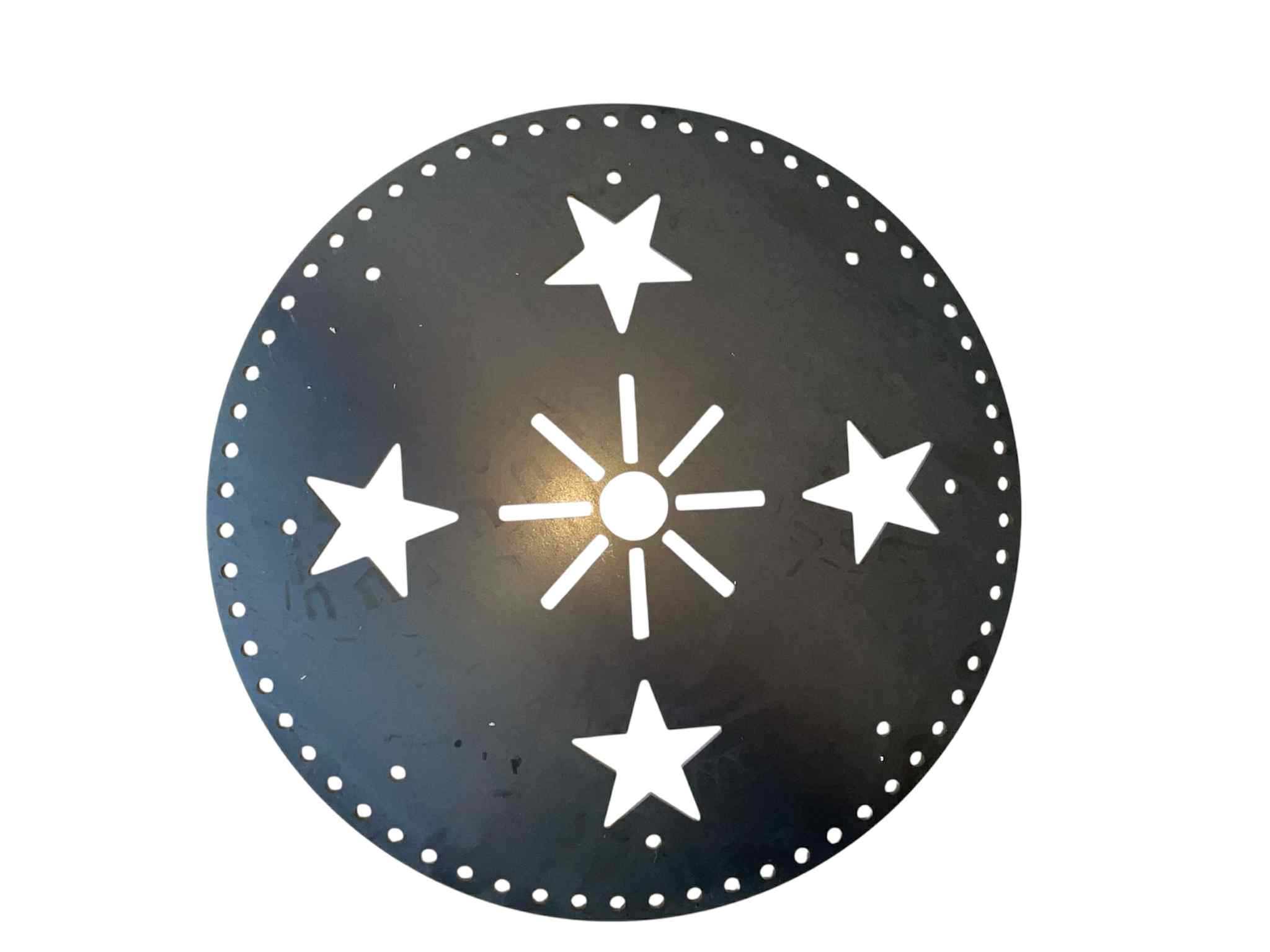
5 mm grade 350 mild steel. Small 203 mm (24 holes), medium 304 mm (32 holes), large 457 mm (64 holes). Raw or black powder coat.
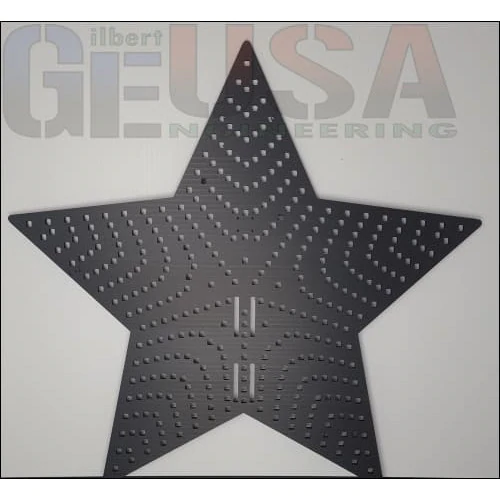
A 370 node pixel star, about 914 mm wide, in 10 mm coroflute. Comes with braces to mount it to the pole.

No room for a full mega tree? A flat mega tree gives you the look against a wall or fence.
We also make other star tree toppers, including the Star 36-150, 36-270, 46-270, 46-460 and 45-440, in plain or IMPRESSION UV printed. See them all in our Pixel Stars range.
Need help planning your mega tree?
Every tree is different. Tell us how tall you want it, how many strings, and the size of your pole, and we can help you pick the right topper and star. Email sales@christmaspropsaustralia.com.au or call 0498 366 850. We cut every part to order in Toogoom, Queensland, and ship Australia-wide.